
On a Baby Jogger City Select stroller, the snack tray usually attaches to the two tray mounts on the stroller seat frame. Align the tray with the mounts, press it in until both sides click, and check that it is locked before placing food or a cup on it.
The exact fit can vary by stroller version, such as the City Select, City Select 2, or City Select LUX. Always match the tray to the model listed on its package or in the Baby Jogger instructions for your U.S. stroller.

Before You Install the City Select Snack Tray
Check that you have the right tray for your stroller. Baby Jogger has made several City Select models, and similar-looking accessories may not fit every version.
Before starting:
- Park the stroller on a flat surface.
- Engage the parking brake.
- Remove the child from the seat.
- Take off any bumper bar or accessory that blocks the tray mounts.
- Check the tray and mounts for cracks, dirt, or loose parts.
- Keep the stroller seat in a position that lets you see both sides of the frame.


The snack tray is an accessory for holding food and drinks. It is not a safety restraint. Your child must remain secured with the stroller’s five-point harness whenever the stroller is moving.
If your tray came with separate mounting adapters, install those adapters first. Some City Select tray designs connect directly to the seat frame, while others use small brackets or mounts. The instruction sheet included with your tray takes priority over general steps.
How to Attach the Snack Tray to a City Select
Follow these steps to install the tray:
Set the stroller brake.
Make sure the stroller cannot roll while you work.Find the tray mounts.
Look on both sides of the seat frame near the front of the seat. The mounts should be at the same height.Remove the existing front accessory if needed.
If a bumper bar or other part is already attached, release it according to its instructions. Do not try to force the snack tray over another accessory unless Baby Jogger says the parts can be used together.Hold the tray level.
Keep the cup holder and food surface facing upward. The left and right sides should line up with the matching mounts.Insert both sides into the mounts.
Guide the tray connectors into the openings at the same time. If one side enters first, keep the tray level rather than twisting it.Press until it clicks.
Push the tray toward the stroller frame with steady pressure. A click on each side usually means the locks have engaged.Pull the tray gently.
Test both sides with a light pull. The tray should stay attached and should not slide out of either mount.Check the child’s space.
Confirm that the tray does not press against the child’s body and that the harness can still be buckled and adjusted correctly.
On models with a swing-open tray, check that the tray opens and closes smoothly after it is attached. Do not use the swing feature as proof that the tray is locked; test the attachment points as well.

How to Tell Whether the Tray Is Secure
A properly installed City Select snack tray should sit evenly from left to right. Both attachment points should be engaged, and the tray should not tilt sharply, wobble, or pull free with a gentle tug.
Use this quick check:
| Check | What you should see |
|---|---|
| Left mount | Fully inserted and locked |
| Right mount | Fully inserted and locked |
| Tray surface | Level or in the normal position for the model |
| Tray movement | No large side-to-side shift |
| Harness | Still easy to buckle and adjust |
| Seat recline | Moves as allowed by the stroller manual |
| Cup holder | Firmly attached and not cracked |
A slight amount of movement may be normal for a removable accessory. However, the tray should not detach when lightly pulled. If one side is higher than the other, remove it and reinstall it rather than trying to bend the tray into place.
Do not use the tray if a latch does not engage, a mount is broken, or the tray falls away from the frame during the pull test.
What to Do If the Snack Tray Will Not Click Into Place
If the tray does not attach, start with the simple causes first.
1. Confirm the stroller and tray models
Check the model name on the stroller frame, owner’s manual, or product label. Then compare it with the compatibility information for the tray. A tray made for another Baby Jogger stroller may look similar but use different mounts.
2. Check the direction
Turn the tray so the eating surface faces up and the cup holder is in its intended position. Reversed or upside-down placement can prevent the connectors from lining up.


3. Inspect both mounts
Look for crumbs, sand, fabric, or another accessory blocking the mount openings. Remove loose debris with a soft, dry brush. Do not use a sharp tool inside the latch.
4. Align both sides before pressing
If one side is inserted while the other side is outside the mount, the tray may sit at an angle. Pull it out, hold it level, and line up both connectors before pressing again.
5. Look for damage
Check the tray connectors, release buttons, and stroller mounts. Stop if plastic is cracked, a latch is bent, or a button stays depressed. A damaged latch may not hold the tray during use.
6. Avoid force
Do not hammer, bend, twist, or lubricate the tray. Force can damage the locking parts and may make the tray less secure. If the correct tray still will not fit, use the model-specific Baby Jogger manual or contact Baby Jogger customer support.
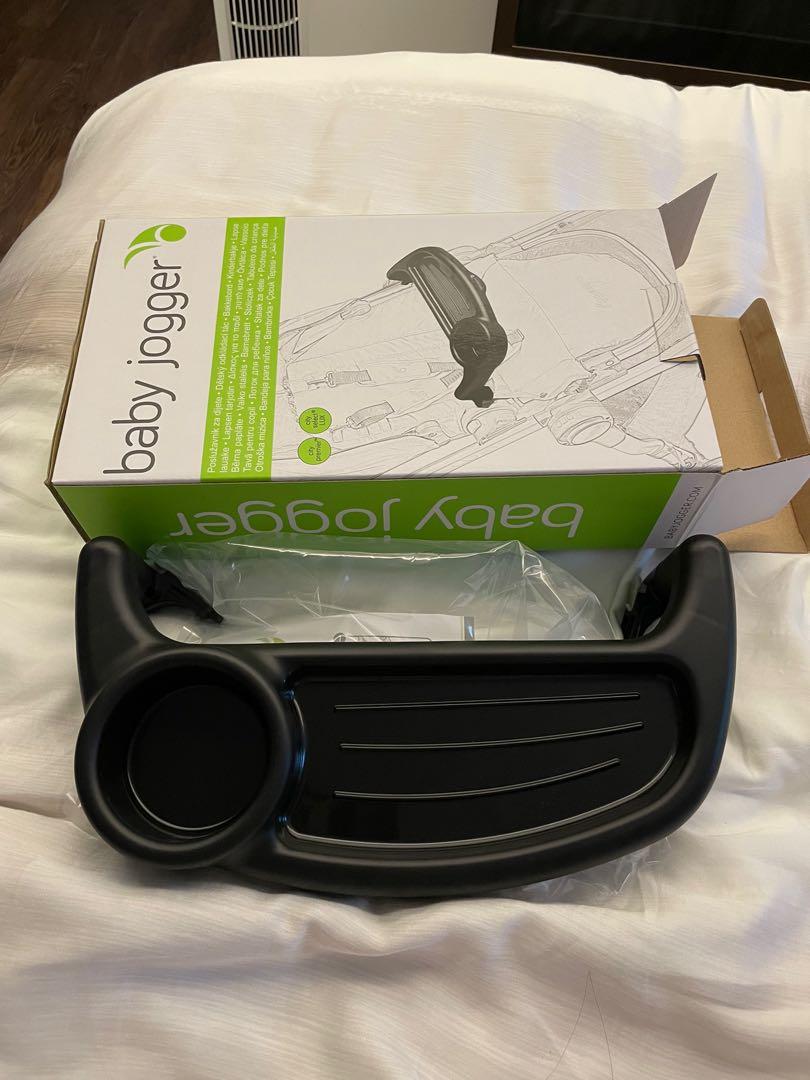
How to Remove the City Select Snack Tray
To remove the tray, take off any food or drink first and keep the stroller brake engaged.
- Find the release buttons or levers on both tray mounts.
- Press the release controls as shown in the tray instructions.
- Pull the tray straight away from the stroller.
- Release one side at a time only if the design allows it.
- Store the tray where the connectors will not be bent or crushed.
Do not pull hard on one corner. Uneven force can stress the mount. If the tray has a hinged section, close or open that section only as described in the manual.
Clean the tray with mild soap and warm water unless the product instructions state otherwise. Dry it fully before storing it or attaching it again.
Can You Use the Snack Tray With Two Seats?
The answer depends on which City Select configuration you are using and where the child seats are mounted.
On a double City Select setup, the snack tray may fit only on a seat in a specific position. The second seat, car seat adapter, glider board, or other accessory may block the tray mount. Never assume that two trays can be used together just because the stroller has two seats.
Check these points:
- The tray is approved for the exact City Select model.
- The seat is in an approved position.
- No adapter or second seat blocks the tray.
- Both tray latches are fully engaged.
- The child can still use the harness correctly.
- The combined setup does not exceed the stroller’s instructions or weight limits.
If the tray cannot attach without pressing against another accessory, do not use that combination.

Common Installation Mistakes
The most common mistake is trying to force a tray that is not made for the stroller version. Compatibility is more important than appearance.
Other errors include:
- Attaching only one side.
- Leaving a bumper bar in place when it must be removed.
- Holding the tray at an angle.
- Testing the tray only by looking at it.
- Using the tray as a handle to lift the stroller.
- Placing a hot drink in the cup holder.
- Allowing a child to stand on or lean heavily against the tray.
- Putting the child in the seat before confirming that the tray is secure.
- Treating the tray as a substitute for the harness.
A snack tray can hold light food and a suitable drink, but it should not carry heavy bags or be used to support a child’s weight.


Safety Tips for Using the Tray
Use the snack tray only for its intended purpose. Keep the child buckled, and never leave a child alone in the stroller with food or a drink.
For safer use:
- Use a cup with a secure lid.
- Keep hot drinks away from the tray.
- Check the tray before each use.
- Remove food and cups before folding the stroller.
- Keep fingers away from hinge and latch points.
- Stop using the tray if it becomes loose or cracked.
- Follow the stroller’s age, weight, and seating guidance.
- Supervise young children while they eat.
The tray may swing, detach, or become damaged if the stroller is folded with the tray attached when the manual does not allow it. When unsure, remove the tray before folding.

City Select Snack Tray Installation: Quick Troubleshooting Table
| Problem | Likely cause | Best next step |
|---|---|---|
| Tray will not enter either side | Wrong tray or wrong direction | Check the model and turn the tray correctly |
| One side clicks but the other does not | Tray is tilted or misaligned | Remove it and align both sides together |
| Tray feels loose | One latch is not engaged or is damaged | Remove and reinstall; inspect both locks |
| Tray blocks the harness | Wrong seat position or accessory conflict | Change the setup only if the manual allows it |
| Release button will not move | Debris or a damaged latch | Clean gently and stop if the part remains stuck |
| Tray drops during a pull test | Lock is not holding | Do not use the tray; check compatibility and contact support |
| Tray fits but will not fold with stroller | Tray may need to be removed first | Follow the folding instructions for your model |
Frequently Asked Questions
Does the City Select snack tray replace the bumper bar?
Not always. Some tray designs attach in place of a bumper bar, while others use separate mounts. Check the instructions for your exact tray and stroller. Do not use both parts together unless Baby Jogger lists that combination as compatible.
Can I leave the snack tray attached when folding the stroller?
Only if the owner’s manual says that folding with the tray attached is allowed. Many accessories must be removed before folding. Removing the tray also helps prevent pressure on the latch and frame.
Why does my City Select tray wobble?
A small amount of movement may be normal, but a large wobble can mean that one side is not locked, the tray is not compatible, or a mount is worn. Remove the tray, inspect both sides, and repeat the pull test. Do not use it if it can detach.
Can a child stand on the snack tray?
No. The tray is not designed to support a child’s weight. Keep the child seated and secured with the harness.
What if I lost the tray instructions?
Use the owner’s manual for the exact City Select model and look for the accessory installation section. You can also check the official Baby Jogger support materials or contact Baby Jogger with the stroller and tray model names. Avoid relying on a similar-looking tray manual.
Final Check Before Use
To put a snack tray on a City Select, match the correct tray to the stroller, line up both mounts, press until both sides lock, and test the attachment with a gentle pull. Keep the brake on during installation, use the harness, and never force a tray that does not fit.
If the tray remains loose after correct alignment, stop using it until the model and locking parts have been checked.